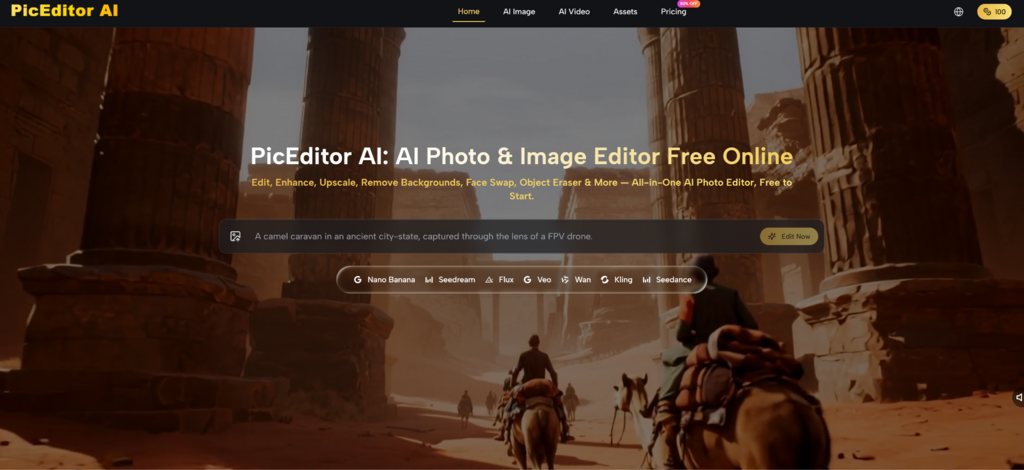
For years, casual creators have stared at toolbars crowded with icons they do not recognize. The moment a photo needs a clean background or softer skin, the typical response is to open a complex editor, search for a tutorial, and hope the result does not look overcooked. That friction keeps many good images trapped on hard drives. The AI Photo Editor from PicEditor AI approaches this problem from a different direction: instead of making users learn professional controls, it asks them to type what they want in plain English. I spent several sessions deliberately avoiding sliders and menus, relying only on written instructions to gauge how far conversational editing can actually go.
Testing Verbal Control Across Three Common Tasks
I built a small challenge to see where the language-based approach shines and where it stumbles. Each task started with a raw image and a single-sentence command written without consulting templates. I then allowed one round of refinement to see if rephrasing could fix early failures.
Portrait Cleanup Without Touching a Healing Brush
The first test used a phone selfie with uneven indoor lighting, a cluttered bookshelf behind the subject, and a distracting reflection on the glasses. The instruction was “remove the background, replace it with a soft blurred park scene, even out skin tones, and keep the glasses reflection natural.” The tool separated the subject and inserted the new background in roughly twelve seconds. Skin smoothing was visible but subtle enough that the person’s freckles remained visible, which the phrase “even out skin tones” seemed to interpret correctly. The glasses reflection stayed largely intact, though a tiny edge artifact appeared where a bookshelf line used to cross the frame.
Product Shot Editing with Descriptive Language
I photographed a handmade leather wallet on a wooden desk strewn with cables. The command read “erase the cables and the desk texture, place the wallet on a clean white surface, and add a gentle shadow beneath it.” The distraction removal succeeded without smudging the wallet’s stitching detail. The new white background appeared uniformly bright, and the added shadow grounded the object naturally. One limitation surfaced: the wallet’s original warm color balance cooled slightly after the edit, suggesting the AI prioritized background consistency over preserving the exact white point. A follow-up instruction “restore the original warm tone” brought it back within one extra step.
Photo-to-Video Animation with a Single Sentence
Turning a still lake scene into a short clip required nothing more than “animate the water and make the clouds drift slowly.” The output produced subtle ripples and cloud movement over several seconds. The shoreline and trees stayed perfectly still, which created a believable effect. When I tried the same command on a busy street photo, however, the motion distribution became less predictable. A parked bicycle moved slightly while a walking pedestrian stayed frozen, indicating the engine prioritizes detected motion cues that do not always match human expectations.
How a Session Unfolds in Three Straightforward Steps
The editing process follows a clear path that matches the way people think about fixing an image: upload, describe, refine.
Upload and Pick the Editing Function
Dragging an image onto the browser canvas opens the full toolkit on the left side. Background removal, object erasure, face swap, upscale, style transfer, and photo-to-video appear as labeled buttons, each activating a dedicated prompt field. No account creation or setup wizard interrupts this first moment.
Immediate Feedback Without Setup
In every test session, the image appeared on the canvas within a second of uploading, and the editing tools lit up immediately. The interface does not demand file format conversions or resolution checks before letting a user begin.
Describe the Edit in a Sentence or Two
The prompt field accepts everyday language. “Remove the watermark from the bottom right corner” works as reliably as longer, more detailed descriptions. The engine appears tuned to parse actionable verbs and visual attributes rather than stylistic fluff.
Why Specific Adjectives Outperform Vague Requests
When I typed “make this photo look better,” the result was inconsistent—sometimes a slight contrast boost, sometimes no visible change. In contrast, “increase contrast, warm the white balance, and sharpen the eyelashes” produced a repeatable outcome across three attempts. The lesson from repeated testing is that the tool rewards users who state visual goals clearly, much like giving direction to a human retoucher.
Switch Models to Match the Creative Intent
A small selector above the prompt area lists available engines. Different models emphasize different qualities: one preserves skin texture with photographic realism, another handles text within images more cleanly, and a third pushes artistic rendering further. The same instruction can be run on multiple models without restarting the workflow.
A Practical Example of Model Choice
For a travel portrait, I used the AI Image Editor with a model known for realistic skin and asked for “soft morning light, warm tones, blur the distant background.” One engine kept pores visible but slightly muted the background blur. Switching to another model intensified the background separation at a minor cost to skin subtlety. Neither version was wrong; the choice came down to whether the priority was facial detail or depth of field.
Comparing Prompt-Based Editing with Traditional Approaches
The table below places the language-driven workflow alongside methods that rely on manual controls or single-function AI tools.
Approach
Control Method
Learning Curve
Editing Speed
Suitability
PicEditor AI (prompt-based)
Natural language sentences
Low, but phrasing matters
Fast for described edits
Casual creators, quick fixes, content production
Desktop editing suites
Sliders, layers, masks
High, requires training
Slow to medium, highly precise
Professional retouchers, complex composites
Single-function web tools
Menus and single-purpose AI
Low per tool, multiplies across tools
Fast for one task, slows with multiple tools
Users with isolated needs
Realistic Limits of Language-Only Editing
Relying entirely on written instructions reveals boundaries that are easy to overlook in demonstrations. Ambiguous wording often yields ambiguous results; “make the colors pop” means different things to different images and the engine may guess incorrectly. Users who are not accustomed to describing visual changes will need a short adjustment period to learn which terms produce dependable outcomes.
Edges around fine structures, such as wind-blown hair against a busy backdrop, still show soft artifacts that a manual brush could refine in seconds but a prompt alone cannot fix. Photo-to-video animation works more reliably on scenes with obvious motion cues like water and sky. Scenes with complex overlapping movement may produce unnatural results, and the current version does not allow users to specify which elements should stay static.
The free tier removes watermarks for basic edits and lets users explore most functions. Heavy or commercial use calls for the paid Starter plan at roughly eight dollars per month billed yearly, with higher tiers unlocking private generation and unlimited usage. That pricing makes sense for consistent, moderate-volume editing but adds a recurring cost worth calculating for those who only edit sporadically.
Who Gains the Most from Describing Instead of Clicking
Creators who think in words rather than visual tools will find this interaction model immediately more accessible. Bloggers, social media managers, and small business owners who need clean images but lack design training can produce usable results by simply typing what they see in their mind. The time saved is not only in the edit itself but in avoiding the cycle of searching for tutorials and navigating unfamiliar interfaces.
The approach fits less neatly into the workflow of professional retouchers who already have muscle memory for manual tools and need pixel-level control. For them, prompt-based editing might serve as a rapid draft generator before finishing work in dedicated software. After several hours of writing commands instead of clicking buttons, the biggest takeaway is that the platform treats language as a legitimate interface, not as a gimmick. When the description matches the visual intent, the gap between thinking about an edit and seeing it appear shrinks to a few seconds.