Whether putting together a campus life vlog, editing a focused “Study With Me” session, or finalizing a travel record, creators frequently encounter the same frustrating problem: a beautiful B-roll shot is missing for a smooth transition. Going back outside to film that specific sunset or cafe scene takes up far too much time. On the other hand, purchasing high-quality clips from professional stock footage libraries is simply too expensive for routine editing.
The solution follows a very straightforward core logic: whatever shot is missing, simply “write” it out using text. Powered by Sora 2, the S2V website functions exactly as a free personal stock library for these exact moments. Instead of compromising the visual flow of the video, creators can type a few descriptive words and immediately generate the precise cinematic cutaway needed to complete the project.
I. The Agony of the Missing Transition Shot
- The Study Routine Constraints
Filming a productive study session requires intense focus. Setting up cameras, managing lighting, and actually completing coursework leaves little room for capturing artistic cutaways. When it comes time to edit, the timeline often looks repetitive. A sudden cut from hour one to hour three feels jarring without a soft transition.
Creators need quiet establishing shots to show the passage of time. Stopping the study flow to film these inserts breaks concentration entirely. The lack of these subtle transitions can make a perfectly good vlog feel amateurish and rushed.
- The Incomplete Travel Itinerary
Travel vlogs thrive on atmosphere and location establishment. A creator might capture excellent footage of a historic monument, but completely forget to film the bustling street corner leading up to it. Weather conditions frequently ruin planned scenic shots, leaving the narrative without essential visual context.
Returning to the location is rarely an option once the trip concludes. The narrative suffers when these establishing visuals are completely absent from the final edit. Viewers lose the sense of immersion that makes travel content so appealing in the first place.
- The Burden of Traditional Stock Footage
When original footage fails, creators often turn to online stock libraries. This process introduces entirely new frustrations. Searching through thousands of generic clips rarely yields the exact angle, lighting, or subject matter required. The process is tedious and disrupts the editing momentum.
Even when a passable clip surfaces, the licensing fees are incredibly steep. Paying a premium for three seconds of a bird flying across the sky makes no financial sense for independent creators. The cost barrier prevents smaller channels from achieving a truly cinematic feel.
II. Enter S2V: Writing Your Way to Cinematic Footage
- The Core Concept of the Website
Imagine having a dedicated camera crew ready to film any concept upon request. S2V functions exactly like that personal crew, operating entirely through text input. The website acts as a free personal stock library, generating customized clips based purely on written instructions.
If a vlog needs a slow-motion shot of autumn leaves falling onto a park bench, the user simply types that exact phrase. The resulting footage matches the exact specifications requested. There is no need to compromise on the creative vision or settle for “close enough” stock video.
- Generating Clips with Advanced Models
The technology driving this creative freedom is remarkable. By integrating the Sora 2 system, the website understands complex physical dynamics, lighting interactions, and camera movements. Users do not need any 3D rendering experience or complex animation skills to produce professional results.
They only need a clear vision of what the missing B-roll should look like. A well-written sentence is the only requirement to produce stunning visuals. The barrier to entry for professional-grade transitions is completely removed, democratizing high-quality video production.
- Cost Efficiency and Workflow Improvement
Managing a creative budget requires strict discipline. Spending money on expensive subscriptions for generic stock footage limits resources for better microphones or camera lenses. S2V eliminates this unnecessary expense by providing unlimited creative potential directly through the browser.
Creators maintain full control over their production budget while simultaneously improving the visual quality of their content. The editing workflow becomes faster, cheaper, and significantly less stressful. Time previously spent hunting for clips is now spent perfecting the final cut.
III. The Step-by-Step Video Generation Process
- Accessing the Generator Dashboard
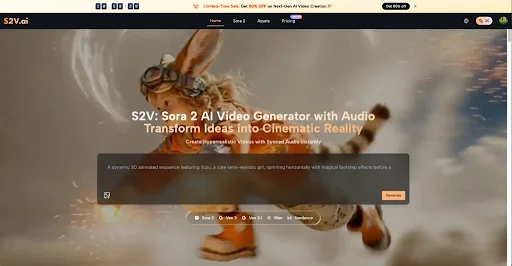
The video creation process begins immediately upon entering the website. Users navigate to the main generation interface, which is designed for pure simplicity. A clean, straightforward text box sits at the center of the screen, waiting for input.
There are no confusing menus or overly technical settings to configure before starting. The layout ensures that creators can focus entirely on their artistic vision rather than wrestling with complex software mechanics. The user experience prioritizes immediate creation over steep learning curves.
- Entering the Descriptive Prompt
This step determines the quality of the final output. Users type a detailed description of the desired B-roll into the text box. The most effective prompts include specific details about the subject, the lighting conditions, and the camera angle.
For example, instead of typing “coffee,” a better input would be “a close-up of dark espresso pouring into a clear glass mug on a wooden table, warm morning sunlight.” The Sora 2 AI model analyzes these precise details to construct the scene accurately, delivering exactly what the edit requires.
- Downloading the Final Clip
Once the prompt is finalized, initiating the generation process takes a single click. The website processes the text and quickly renders the high-definition footage. Users can preview the result directly within the browser interface to ensure it meets their standards.
If the clip perfectly matches the required transition, a prominent download button saves the file directly to the local hard drive. The footage is instantly ready to be imported into any timeline editing software, seamlessly bridging the gap between imagination and reality.

IV. Crafting Prompts for Flawless Vlog Integration
- Defining the Core Subject and Action
A successful B-roll clip requires a clear focal point. Vague instructions lead to confusing and unusable footage. Creators must clearly identify what the main object is and what it is doing within the scene.
If a study vlog needs a break transition, the prompt should specify an action like “a hand gently closing a thick textbook.” By giving the prompt a definitive subject, the resulting Sora 2 AI Video looks intentional and highly professional, fitting right into the existing narrative.
- Establishing Lighting and Atmosphere
Lighting dictates the emotional tone of a video. A harsh, bright light feels energetic, while soft, warm light feels relaxing. When generating footage, users must explicitly state the desired lighting conditions to match their original footage.
Phrases like “golden hour sunlight,” “soft overcast daylight,” or “warm incandescent room lighting” ensure the generated clip blends seamlessly. Consistent lighting prevents the audience from noticing the switch between real footage and the generated Sora 2 AI Video.
- Specifying Camera Movement and Angles
Cinematic B-roll relies heavily on how the camera captures the subject. A static shot offers a different feeling than a slow, sweeping pan. Creators should include directorial commands within their text prompts to guide the generation process.
Adding terms like “slow zoom in,” “low angle shot,” or “tracking shot moving left” gives the final video a dynamic quality. Using Sora 2 to execute complex camera movements adds immense production value without requiring expensive stabilizing gimbals or specialized camera operators.
V. Advanced Editing Techniques for Generated B-Roll
- Matching the Color Palette
Even the most realistic generated footage needs slight adjustments to fit perfectly into a vlog. Every camera has a unique color science, and creators often apply custom look-up tables to their footage.
Once the clip is imported into the editing software, adjusting the contrast, saturation, and color temperature is essential. Applying the exact same color grading to the generated clip ensures visual continuity. This final polish makes the transition undetectable to the viewer.
- Layering Audio for Realism
A silent clip immediately signals to the audience that something is off. Great B-roll is as much about sound as it is about visuals. Creators must add appropriate sound effects to sell the illusion completely and maintain immersion.
If the Sora 2 AI generates a bustling cafe window, layering soft background chatter and the clinking of cups over the footage makes it feel authentic. High-quality audio work bridges the gap between the generated visual and the physical environment established in the rest of the vlog.
- Timing the Cuts Perfectly
The placement of the B-roll determines its overall effectiveness. Cutting away to a transition shot too early disrupts the flow of the speaker, while cutting too late feels awkward and forced.
Creators should look for natural pauses in the dialogue or changes in the musical beat to introduce the generated footage. A perfectly timed cut into a beautifully generated cinematic clip elevates the entire viewing experience, keeping the audience engaged and impressed from start to finish.
Conclusion
The days of abandoning a video project due to a single missing shot are finally over. The ability to simply describe a desired scene and watch it materialize provides creators with unprecedented freedom and flexibility. S2V serves as an indispensable resource for anyone looking to elevate their production value without expanding their budget.
By integrating a Sora 2 AI Video into the editing workflow, student vloggers, travelers, and daily creators can solve visual gaps instantly. Embrace the power of Sora 2 and let your text prompts build the ultimate, free personal stock library. The perfect sunset shot is now just a sentence away, powered by the incredible capabilities of Sora 2 AI.